ip
Bhaymax User Guide
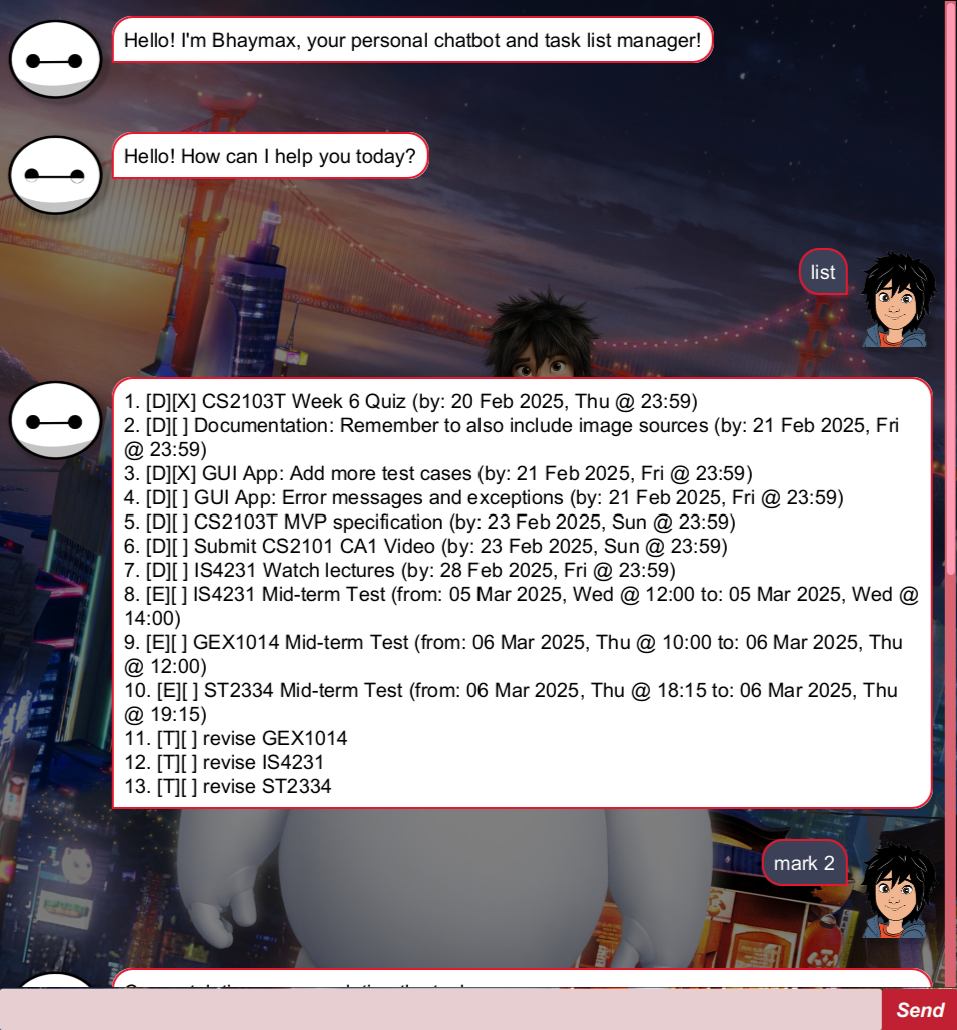
Bhaymax is a chatbot app that is designed to manage tasks {i.e., to-do items, deadlines and events}.
Usage
- Make sure Java 17 is installed in your computer.
- Bhaymax is available as a Java Archive (
.jar) file. You can download the latest version from this URL. - Copy the
.jarfile (downloaded in step 2.) to the folder you want to use as the home folder for the application. - Open a terminal and change your working directory to the folder selected in step 3.
- Execute the app by running
java -jar bhaymax.java - You should see a window similar to the one shown above.
Features
Greeting the chatbot (Optional)
Greets the chatbot. (And the chatbot greets you back!)
Format: hello or hi
Adding To-Do Items: todo
Adds a to-do item to be tracked.
Format: todo {description}
Explanation of parameters:
{description}: (Compulsory) A brief description about the to-do item to be created.
Examples:
todo get notes from friendtodo buy groceries for mothertodo study
Adding Deadlines: deadline
Adds a deadline item to be tracked.
Format: deadline {description} /by {due-by date}
Explanation of parameters:
{description}: (Compulsory) A brief description about the deadline item to be created.{due-by date}: (Compulsory) The date and time at which the deadline is due by, in the formatdd/MM/yyyy HH:mm- Order of the parameters must be followed strictly (i.e.,
{description}afterdeadline,{description}and{due-by date}separated by ` /by `)
Examples:
- You need to submit a report by 20 March 2025, 11:59 pm
deadline submit report /by 20/03/2025 23:59
- You are required to finish your essay by 05 January 2026,
1:00pm
deadline finish essay /by 05/01/2025 13:00
Adding Events: event
Adds an event to be tracked.
Format: event {description} /from {start date} /to {end date}
Explanation of parameters:
{description}: (Compulsory) A brief description about the event to be created.{start date}: (Compulsory) The date and time at which the event starts, in the formatdd/MM/yyyy HH:mm{end date}: (Compulsory) The date and time at which the event end, in the formatdd/MM/yyyy HH:mm- Order of the parameters must be followed strictly (i.e.,
{description}afterevent,{description}and{start date}separated by ` /from `, etc.)
Examples:
- You have a mid-terms on 5 March 2025 from 12pm to 2pm
event mid-terms /from 05/03/2025 12:00 /to 05/03/2025
14:00
- There is a movie screening on 22 February 2025 from 1pm to
3pm
event movie screening /from 22/02/2025 13:00 /to
22/02/2025 15:00
Listing all tasks and events: list
Shows a list of all to-do items, deadlines and events created.
Format: list
Filtering deadlines and events by date: filter
Filters deadlines and events by date.
Format: search {filter_option} {date / date and time}
Explanation of parameters:
{filter_option}: One of 6 values -/before,/on,/after,/before_time,/on_time,/after_time- Each option specifies whether to list deadlines and events occurring before, on or after the date specified
- Suffix an option with
_timeif you also wish to specify the time to filter by
{date / date and time}: The date or the date and time to filter by, in the formatdd/MM/yyyyanddd/MM/yyyy HH:mmrespectively- If the
{filter_option}provided contains the suffix_time, then a time is also required for the filter
- If the
- Order of the parameters must be followed strictly.
Examples:
- To filter for deadline and events due by / occurring BEFORE March 2nd, 2025:
filter /before 02/03/2025
- To filter for deadline and events due by / occurring ON March 2nd, 2025:
filter /on 02/03/2025
- To filter for deadline and events due by / occurring AFTER March 2nd, 2025:
filter /after 02/03/2025
- To filter for deadline and events due by / occurring BEFORE March 2nd, 2025, 11:59pm:
filter /before_time 02/03/2025 23:59
- To filter for deadline and events due by / occurring ON March 2nd, 2025, 11:59pm:
filter /on_time 02/03/2025
- To filter for deadline and events due by / occurring AFTER March 2nd, 2025, 11:59pm:
filter /after_time 02/03/2025 23:59Note that for the last three examples the
{filter_option}is suffixed with_timeas we are specifying the time (alongside the date) to filter the tasks by.
Search for tasks with description matching keywords: search
Searches for a task that has a description matching the provided search term.
Format: search {keyword or phrase}
Explanation of parameters:
{keyword or phrase}: (Compulsory) A keyword or a phrase to search for
Examples:
search examsearch buysearch movie
Marking a task as completed: mark
Marks a task (i.e., a to-do item, deadline or event) as completed.
Format: mark {index of task}
Explanation of parameters:
{index of task}: (Compulsory) The index number of the task to be marked as completed. This number can be retrieved using the output oflist.
Examples:
mark 11mark 1mark 23
Marking a task as incomplete: unmark
Marks a task (i.e., a to-do item, deadline or event) as incomplete.
Format: unmark {index of task}
Explanation of parameters:
{index of task}: (Compulsory) The index number of the task to be marked as incomplete. This number can be retrieved using the output oflist.
Examples:
unmark 11unmark 1unmark 23
Deleting a task: delete
Removes a task (i.e., a to-do item, deadline or event) from getting tracked.
Format: delete {index of task}
Explanation of parameters:
{index of task}: (Compulsory) The index number of the task to be deleted. This number can be retrieved using the output oflist.
Examples:
delete 11delete 1delete 23
Clear the chat area: clear
Clears the chat (box) area.
Format: clear
Exiting the program: bye or exit
Exits the program.
Format: bye or exit
Editing the data file
The data file is automatically created when a task is added to the program.
It is saved at [JAR file location]/data/tasks.txt.
Tasks are stored in the following format:
- To-do item:
- Format:
T | {task completion status} | {task description} {task completion status}: Indicates whether the task has been marked as completed. It can take one of two values:1- Indicates the task has been marked as completed0- Indicates the task has been marked as incomplete
{task description}: A brief description about the to-do item.
- Format:
- Deadline item:
- Format:
D | {task completion status} | {task description} | {due-by date} {task completion status}: Indicates whether the task has been marked as completed. It can take one of two values:1- Indicates the task has been marked as completed0- Indicates the task has been marked as incomplete
{task description}: A brief description about the deadline.{due-by date}: The date and time the deadline item is due by. Specified in the formatdd/MM/yyyy HH:mm.
- Format:
- Event:
- Format:
E | {task completion status} | {task description} | {start date} | {end date} {task completion status}: Indicates whether the task has been marked as completed. It can take one of two values:1- Indicates the task has been marked as completed0- Indicates the task has been marked as incomplete
{task description}: A brief description about the event.{start date}: The date and time at which the event starts, in the formatdd/MM/yyyy HH:mm.{end date}: The date and time at which the event ends, in the formatdd/MM/yyyy HH:mm.
- Format: